API Example
By directly accessing the Fairical Python API you may use functionality functionality of the library. For example, all Command-line Apps provide a comprehensive correspondence in API, including further customisation parameters. You will find below the equivalent CLI Example directly using the available API.
Note
See CLI Example for obtaining sample data for this example.
Generate solutions or operating modes:
import numpy
import fairical.scores

thresholds = list(numpy.linspace(0, 1, 10, dtype=float))
metrics = ["acc", "eod+gender"]

scores1 = fairical.scores.Scores.load("sample/system_1.json")
scores2 = fairical.scores.Scores.load("sample/system_2.json")

sol1 = scores1.solutions_a_posteriori(metrics, thresholds).deduplicate()
sol2 = scores2.solutions_a_posteriori(metrics, thresholds).deduplicate()
Note
Computing a-priori solutions
To compute a-priori solutions, just pass the solutions calculated a previous step. For example, to apply operating models from
sol2onscores1above, just do:import pathlib metrics = list(sol2.points.keys()) # apply all operating modes @system_2.json to scores of system_1.json sol1_a_priori = scores1.solutions_a_priori(metrics, sol2).deduplicate() # apply only non-dominated solutions sol1_a_priori = scores1.solutions_a_priori(metrics, sol2, dominated=False).deduplicate() # apply only dominated solutions sol1_a_priori = scores1.solutions_a_priori(metrics, sol2, dominated=True).deduplicate() # record prior solutions filename on metadata (just for informational purposes) sol1_a_priori.metadata["prior-solution-from"] = "sample/system_2.json"
Note
Save/load data
It’s possible to save (or load) the solutions directly to (from) a JSON representation (see Solutions).
import pathlib
import tempfile

with tempfile.TemporaryDirectory() as p:
    sol1.save(pathlib.Path(p) / "system_1.json")
    sol2.save(pathlib.Path(p) / "system_2.json")
To save the non-dominated solutions:
import pathlib
import tempfile

nds, _ = sol1.non_dominated_solutions()

with tempfile.TemporaryDirectory() as p:
   nds.save(pathlib.Path(p) / "system_1_nds.json")
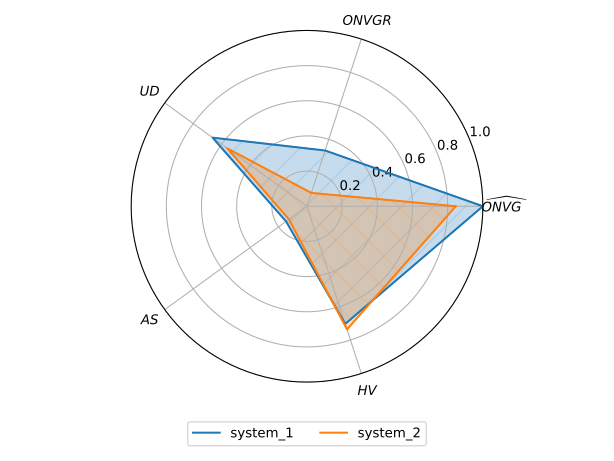
Evaluate indicators (of estimated Pareto front - non-dominated solutions), print table and radar chart:
import fairical.utils

ind1 = sol1.indicators()
ind2 = sol2.indicators()

indicators = {"system 1": ind1, "system 2": ind2}
table = fairical.utils.make_table(indicators, fmt="simple")
print(table)
  System    RELATIVE-ONVG    ONVGR    UD    AS    HV    Area
--------  ---------------  -------  ----  ----  ----  ------
system 1             1.00     0.33  0.66  0.15  0.70    0.29
system 2             0.85     0.08  0.56  0.13  0.74    0.18
To plot a graphical representation of this table, do the following:
import fairical.plot
fig, ax = fairical.plot.radar_chart(indicators)
fig.savefig("radar.pdf")
This code should generate a plot like the following:
Visualize the Pareto front (estimate):
nds_ds = {
   "system 1": sol1.non_dominated_solutions(),
   "system 2": sol2.non_dominated_solutions()
}

for label, (nds, _) in nds_ds.items():
   table = nds.tabulate()

   print(f"Pareto front for {label}")
   print(table)

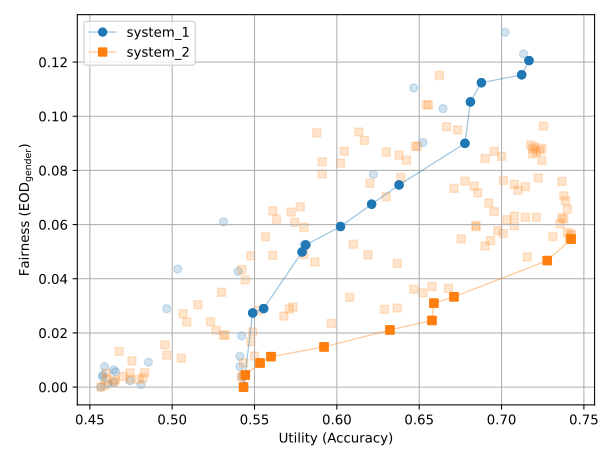
fig, ax = fairical.plot.pareto_plot(nds_ds)
fig.savefig("pareto.pdf")
This code should generate the following tables in the terminal
(acc, eod+gender)
thresholds
identifiers
(0.5433333333333333, 0.0)
0
model-1
(0.5811111111111111, 0.05247311827956991)
0.333333
model-1
(0.6811111111111111, 0.10530303030303034)
0.444444
model-1
(0.7166666666666667, 0.12055555555555564)
0.555556
model-1
(0.5555555555555556, 0.02898989898989901)
0.333333
model-2
(0.7122222222222222, 0.11530303030303035)
0.555556
model-3
(0.6377777777777778, 0.07464646464646463)
0.444444
model-4
(0.6211111111111111, 0.06752688172043009)
0.444444
model-5
(0.6877777777777778, 0.1123737373737374)
0.555556
model-5
(0.5788888888888889, 0.04989247311827949)
0.444444
model-6
(0.6777777777777778, 0.09000000000000002)
0.555556
model-6
(0.5488888888888889, 0.027383512544802868)
0.444444
model-7
(0.6022222222222222, 0.059292929292929286)
0.555556
model-8
(acc, eod+gender)
thresholds
identifiers
(0.5433333333333333, 0.0)
0
model-1
(0.7277777777777777, 0.04671717171717171)
0.333333
model-1
(0.5444444444444444, 0.004444444444444473)
0.111111
model-6
(0.7422222222222222, 0.05464646464646472)
0.444444
model-6
(0.6711111111111111, 0.033333333333333326)
0.333333
model-8
(0.6577777777777778, 0.024595959595959616)
0.333333
model-9
(0.56, 0.011254480286738366)
0.333333
model-16
(0.6588888888888889, 0.031010101010101043)
0.444444
model-19
(0.6322222222222222, 0.02111111111111119)
0.444444
model-20
(0.5922222222222222, 0.014838709677419404)
0.444444
model-21
(0.5533333333333333, 0.008888888888888835)
0.444444
model-22
and save the following plot: